> For the complete documentation index, see [llms.txt](https://enterprise-docs.datacamp.com/llms.txt). Markdown versions of documentation pages are available by appending `.md` to page URLs; this page is available as [Markdown](https://enterprise-docs.datacamp.com/data-connector-1.0-documentation/data-connector-1.0-explore-data-model/data-connector-1.0-data-model.md).
# \[Data Connector 1.0] Data Model
The data model for the data connector 1.0 provides data on activity for users in a group across different content types. The currently supported content types are:
* Assessments
* Assignments
* Certification
* Courses
* Practice
* Projects
* Tracks
* DataLab (formerly Workspace)
### The Data Connector's 1.0 Data Model
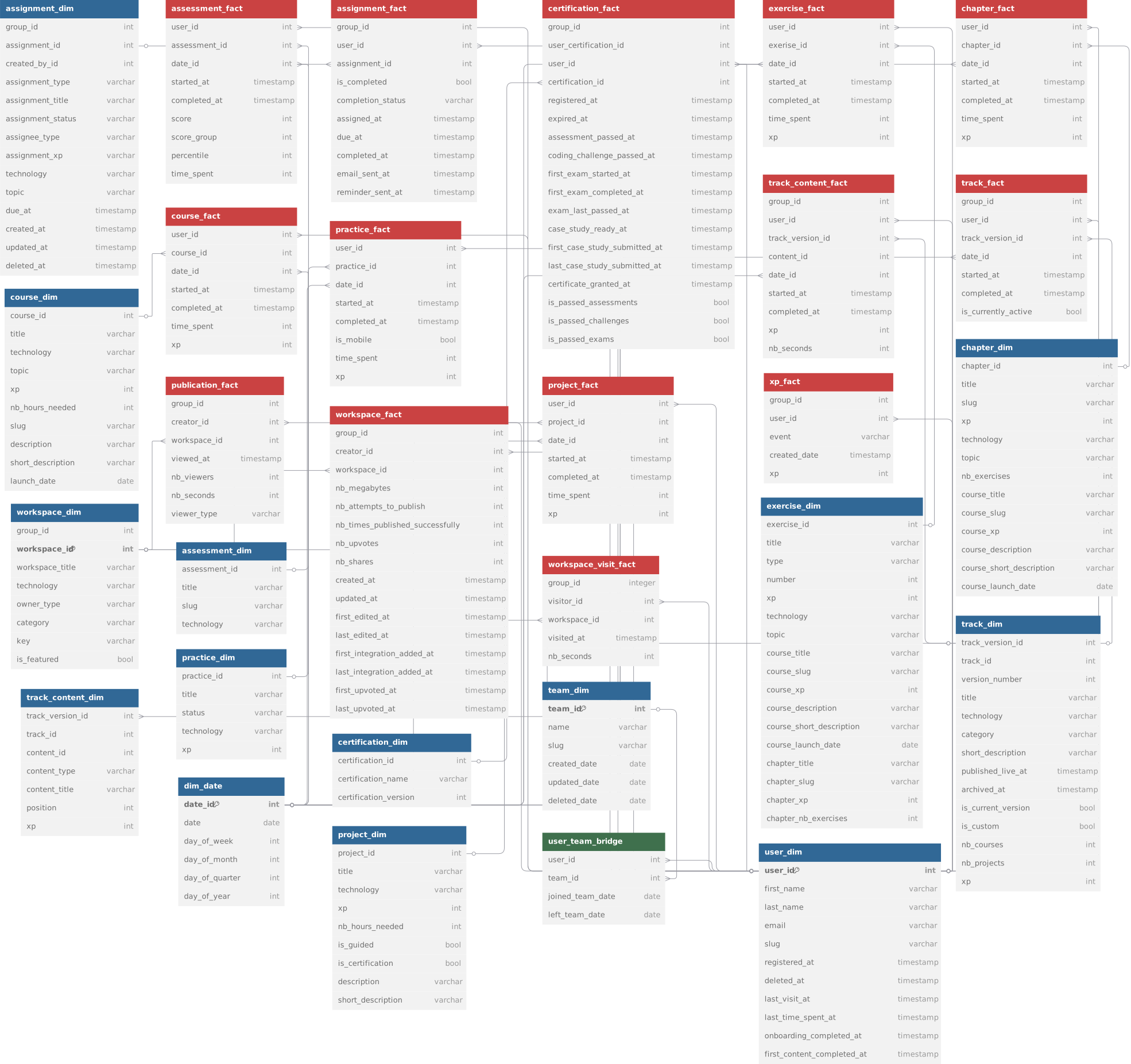
The diagram below shows the relationships between the tables that make up the Data Connector's 1.0 data model:
### How to work with the data?
The data available from the Data Connector 1.0 is modeled using a dimensional model. This means there are fact, dimension, and bridge tables available.
{% tabs %}
{% tab title="Facts" %}
Facts are the measurements/metrics or facts from your user activity on DataCamp.
`course_fact` for exampl,e contains measures like XP and time\_spent on courses by your users.
`assessment_fact` contains measures like score and percentile for the assessment scores your users have registered on DataCamp.
{% endtab %}
{% tab title="Dimensions" %}
Dimension provides the context surrounding the fact tables. In simple terms, they give who, what, where of a fact. In other words, a dimension is a window to view information in the facts.
The `course_fact` table can for example be joined with the `course_dim` table to find out more information about the courses (like title, technology, instructor, ...) or with `user_dim` to get information on the users (like email, name, registration date, etc ...)
{% endtab %}
{% tab title="Bridges" %}
Bridge tables are used to connect fact and/or dimension tables together. Bridge tables are also referred to as "join tables" in classic SQL.
The `user_team_bridge` table for example can be used to connect a user to the teams they are member of. In this case a bridge table is needed because a single user can be member of multiple teams at the same time.
{% endtab %}
{% endtabs %}
You can join the fact tables with the dimension tables to summarize XP and time spent across technology, topic, etc.
The data model also provides dimension tables at the user level `user_dim`, `team_dim`, `group_dim`, and bridge tables `user_team_bridge` to facilitate analysis at the team or user level.
For example, you can aggregate the `xp` gained and `time_spent` by week across `technology` and `team` with the following query.
{% tabs %}
{% tab title="SQL" %}
```sql
SELECT team_id,
week_start_date,
technology,
SUM(xp) AS xp,
SUM(time_spent)/3600 AS time_spent_hours
FROM course_fact
INNER JOIN course_dim USING(course_id)
INNER JOIN date_dim USING(date_id)
INNER JOIN user_team_bridge USING(user_id)
INNER JOIN team_dim USING(team_id)
GROUP BY 1, 2, 3
```
{% endtab %}
{% endtabs %}
{% hint style="warning" %}
Warning! The Data Connector's 1.0 fact tables only include:
* learning activity for the dates on which a user was part of the group.
* learning activity for the dates on which the group had an active subscription.
* learning activity performed by users with all license types, including basic.
* learning activity performed in the DataCamp desktop app.
Data Connector 1.0 **does not include time spent on mobile,** this could result in slight differences from other sources of reporting such as exports or our Group Hub.
We fixed this issue in Data Connector 2.0! Please see the [Migrating from Data Connector 1.0](/integrating-our-data-into-your-tools-via-data-connector-2.0/migrating-from-data-connector-1.0.md) section for more information on migration and what has changed.
{% endhint %}
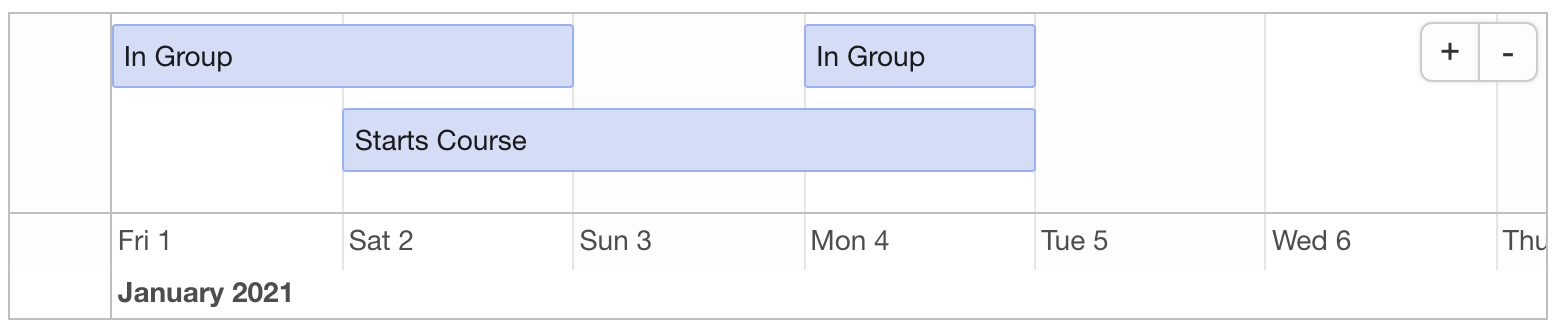
For example, consider user A, who joined group 1234 on Jan 1st, started a course on Jan 2nd, left the group on Jan 3rd while continuing to work on the course, rejoined the group on Jan 4th, and completed the course on Jan 5th.
In this case, the fact tables for group 1234 will not contain data for User A for January 3rd (even though the user continued working on the course).
## Assessments
{% hint style="warning" %}
The Data Connector 1.0 includes **certification** and **private (test-out)** assessments, which differ from standard assessments.
Certification assessments evaluate your knowledge within the Certification process. Private (test-out) assessments are used to skip content within a track if you pass a certain threshold.\
\
Reports in the Group Hub do not include certification and private (test-out) assessments. As a result, the reports in the Group hub may show a slight difference in numbers compared to those reported by the Data Connector.
{% endhint %}
### Assessment Dim
`assessment_dim`: The assessment dimension provides descriptive data about assessments.
| column\_name | column\_description |
| -------------- | ------------------------------------------------ |
| assessment\_id | The unique id of the assessment. |
| title | The title of the assessment. |
| slug | The slug of The assessment. |
| technology | The assessment technology (e.g., Python, R, SQL) |
| id | \[DEPRECATED] Use assessment\_id instead. |
### Assessment Fact
`assessment_fact`: The assessment fact table provides data about the users’ assessment results: score, percentile obtained, and time spent on each assessment.
| column\_name | column\_description |
| -------------- | ------------------------------------------------------------------------------------------------------------------------------------------------------------------------------------------------ |
| user\_id | The unique id of the user id. References user\_dim.id |
| assessment\_id | The unique id of the assessment. References assessment\_dim.id |
| date\_id | The identifier of the date when the user worked on the assessment References dim\_date.id |
| started\_at | The timestamp when the user started the assessment (as registered by the DataCamp application) |
| completed\_at | The timestamp when the user completed the assessment (as registered by the DataCamp application). It is NULL when the user did not complete the assessment. |
| score | The user score for the assessment. |
| score\_group | The user score group for the assessment. A score of < 70 is “Novice”, 70 - 100 as “Intermediate Lower”, 100 - 130 as “Intermediate”, 130 - 160 as “Intermediate Upper”, and > 160 as “Advanced”. |
| percentile | The percentile the user belongs in. |
| time\_spent | The time (in seconds) the user spent on the assessment. |
## Assignments
### Assignment Dim
`assignment_dim`: The assignment dimension table provides data about a specific assignment.
| column\_name | column\_description |
| ------------------ | -------------------------------------------------------------------------------------------------------------------- |
| group\_id | The unique identifier for the group. |
| assignment\_id | The unique identifier for the assignment. |
| created\_by\_id | The user\_id of the user who created the assignment. References user\_dim.user\_id. |
| assignment\_type | The type of assignment (chapter / course / project / assessment / customtrack / xp) |
| assignment\_title | The title of the content item assigned. It is NULL for assignment\_type = ‘xp’, where no content is assigned. |
| assignment\_status | The status of the assignemnt (archived / active). |
| assignee\_type | The type of assignee (user / team / group). |
| assignment\_xp | The XP achieved by completing the assignment. |
| technology | The technology of the associated content item. It is NULL for assignment\_type = ‘xp’, where no content is assigned. |
| topic | The topic of the associated content item. It is NULL for assignment\_type = ‘xp’, where no content is assigned. |
| due\_at | The timestamp when the assignment is due. |
| created\_at | The timestamp when the assignment was created. |
| updated\_at | The timestamp when the assignment was updated. |
| deleted\_at | The timestamp when the assignment was deleted. |
### Assignment Fact
`assignment_fact`: The assignment fact table provides data about the users’ progress on each assignment.
| column\_name | column\_description |
| ------------------ | ----------------------------------------------------------------------------------------------- |
| group\_id | The unique identifier of the group. |
| user\_id | The unique identifier of the user. References user\_dim.user\_id |
| assignment\_id | The unique identifier of the assignment. References assignment\_dim.assignment\_id. |
| is\_completed | A boolean indicating if the user completed the assignment. |
| completion\_status | The status of completion of the assignment. It can be completed / late / in\_progress / missed. |
| assigned\_at | The timestamp when the assignment was created. |
| due\_at | The timestamp when the assignment is due. |
| completed\_at | The timestamp when the user completed the assignment. |
| email\_sent\_at | The timestamp when an email was sent to the user. |
| reminder\_sent\_at | The timestamp when a reminder was sent to the user. |
## Certifications
### Certification Dim
`certification_dim`: The certification dimension provides data about a specific certification. Certification ID 1 and 2 are the so-called v1 iterations of certifications. From June 2022 onwards, we switched to a process where an official certification registration was needed, and this registration would time out after 30 days.
| column\_name | column\_description |
| ---------------------- | ------------------------------------------ |
| certification\_id | A unique identifier for the certification. |
| certification\_name | The name of the certification. |
| certification\_version | The version of the certification. |
### Certification Fact
`certification_fact`: The certification fact table provides data about the users’ progress through different stages of a certification.
| column\_name | column\_description |
| --------------------------------- | ------------------------------------------------------------------------------------------------------------------------------- |
| group\_id | The unique identifier of the group. |
| user\_certification\_id | The unique identifier of a user attempting a certification. A user can have more than one attempt at obtaining a certification. |
| user\_id | The unique identifier of the user. References user\_dim.user\_id |
| certification\_id | The unique identifier of the certification. References certification\_dim.certification\_id. |
| registered\_at | The timestamp when the user registered for the certification attempt. |
| expired\_at | The timestamp when the user certification attempt (will) expire. |
| assessments\_passed\_at | (v1 only) The timestamp when the user passed the assessments. |
| coding\_challenge\_passed\_at | (v1 only) The timestamp when the user passed the coding challenge(s). |
| first\_exam\_started\_at | (v2 only) The timestamp when the user started their first certification exam in an attempt. |
| first\_exam\_completed\_at | (v2 only) The timestamp when the user completed their first certification exam in an attempt. |
| exam\_last\_passed\_at | (v2 only) The timestamp when the user passed their last certification exam. |
| case\_study\_ready\_at | The timestamp when the user passed all stages prior to the practical exam. |
| first\_case\_study\_submitted\_at | The timestamp when the first practical exam was submitted for grading. |
| last\_case\_study\_submitted\_at | The timestamp for then the last practical exam was submitted for grading. |
| certificate\_granted\_at | The date at which the certificate was granted by the admin. |
| is\_passed\_assessments | An indicator whether user passed all timed assessments. |
| is\_passed\_challenges | An indicator whether the user passed all coding challenges. |
| is\_passed\_exams | An indicator whether the user passed all certification exams. |
## Courses
### Exercise Dim
`exercise_dim`: The exercise dimension provides descriptive data about a specific exercise. Because the model considers users’ progress on all exercises (i.e., even exercises that are no longer available), there is a specific row with the id = -1. This row is used in the exercise fact table to refer to a deleted exercise.
| column\_name | column\_description |
| -------------------------- | -------------------------------------------------------------------------------------------------------------------- |
| exercise\_id | The unique id of the exercise id. |
| title | The title of the exercise. |
| type | The type of exercise type (e.g., NormalExercise, VideoExercise, MultipleChoiceExercise, …) |
| number | The number of the exercise in the chapter, accounting for subexercises. This can be used to sort exercises in order. |
| xp | The maximum number of XP a user can get by completing the exercise. |
| technology | The course technology (e.g., Tableau, SQL, Python, R, …) |
| topic | The course topic (e.g., Data visualization, Programming, Machine Learning, …) |
| course\_title | The course title the exercise belongs to. |
| course\_slug | The course slug the exercise belongs to |
| course\_xp | The maximum number of XP a user can get by completing the course the exercise belongs to. |
| course\_description | The course description the exercise belongs to. |
| course\_short\_description | A shorter version of the course description the exercise belongs to. |
| course\_launched\_date | Date at which the course went live. |
| chapter\_title | The chapter title the exercise belongs to. |
| chapter\_slug | The chapter slug the exercise belongs to. |
| chapter\_xp | The maximum number of XP a user can get by completing the chapter the exercise belongs to. |
| chapter\_nb\_exercises | The number of exercises in the chapter the exercise belongs to. |
| id | \[DEPRECATED] Use exercise\_id instead. |
### Exercise Fact
`exercise_fact`: The exercise fact table provides data about the users’ progress: XP gained and time spent on each exercise. The table provides data for exercises that can be no longer available (and deleted from our database). In this case, the exercise\_id value is set to -1 and links to a “deleted exercise” row in the `exercise_dim` table.Fact table for exercise content. It provides engagement and xp measurements on exercise.
| column\_name | column\_description |
| ------------- | --------------------------------------------------------------------------------------------------- |
| user\_id | The unique user id. Reference to user\_dim.id. |
| exercise\_id | The unique exercise\_id. Reference to exercise\_dim.id. |
| date\_id | The date id. Reference to date\_dim.id. |
| started\_at | The timestamp at which the user started the exercise (as registered by the DataCamp application). |
| completed\_at | The timestamp at which the user completed the exercise (as registered by the DataCamp application). |
| time\_spent | How much time (in seconds) the user spent on the exercise? |
| xp | How many XP did the user gain by completing the exercise? |
### Chapter Dim
`chapter_dim`: The chapter dimension provides descriptive data about a specific chapter. Because the model considers users’ progress on all chapters (i.e., even chapters that are no longer available), there is a specific row with the id = -1. This row is used in the chapter fact table to refer to a deleted chapter.
| column\_name | column\_description |
| -------------------------- | ---------------------------------------------------------------------------------------- |
| chapter\_id | The unique id of the chapter id. |
| title | The title of the chapter. |
| slug | The slug of the chapter. |
| xp | The maximum number of XP a user can get by completing the chapter. |
| technology | The course technology (e.g., Tableau, SQL, Python, R, …). |
| topic | The course topic (e.g., Data visualization, Programming, Machine Learning, …). |
| nb\_exercises | The number of exercises in the chapter. |
| course\_title | The title of the course the chapter belongs to. |
| course\_slug | The slug of the course the chapter belongs to. |
| course\_xp | The maximum number of XP a user can get by completing the course the chapter belongs to. |
| course\_description | The description of the course the chapter belongs to. |
| course\_short\_description | A shorter description of the course the chapter belongs to. |
| course\_launched\_date | The date on which the course went live. |
| id | \[DEPRECATED] Use chapter\_id instead. |
### Chapter Fact
`chapter_fact`: The chapter fact table provides data about the users’ progress: XP gained and time spent on each chapter. The table provides data for chapters that can be no longer available (and deleted from our database). In this case, the chapter\_id value is set to -1 and links to a “deleted chapter” row in the chapter\_dim table.
| column\_name | column\_description |
| ------------- | ---------------------------------------------------------------------------------------------- |
| user\_id | The unique id of the user. References to user\_dim.user\_id. |
| chapter\_id | The unique id of the chapter. References to chapter\_dim.chapter\_id. |
| date\_id | The date on which the user worked on the chapter. References to dim\_date.id |
| started\_at | The timestamp when the user started the chapter (as registered by the DataCamp application). |
| completed\_at | The timestamp when the user completed the chapter (as registered by the DataCamp application). |
| time\_spent | The time (in seconds) the user spent on the chapter. |
| xp | The XP the user gained by working on the chapter. |
### Course Dim
`course_dim`: The course dimension provides descriptive data about a specific course. Because the model considers users’ progress on all courses (i.e., even courses that are no longer available), there is a specific row with the id = -1. This row is used in the course fact table to refer to a deleted course.
| column\_name | column\_description |
| ------------------ | ------------------------------------------------------------------------------ |
| course\_id | The unique id of the course. |
| title | The title of the course. |
| technology | The course technology (e.g., Tableau, SQL, Python, R, …). |
| topic | The course topic (e.g., Data visualization, Programming, Machine Learning, …). |
| xp | The maximum number of XP a user can get by following the course. |
| nb\_hours\_needed | Time needed in hours to complete the course. |
| slug | The slug of the course |
| description | A description of the course. |
| short\_description | A short description of the course. |
| launched\_date | The date on which the course went live. |
| id | \[DEPRECATED] Use course\_id instead. |
### Course Fact
`course_fact`: The course fact table provides data about the users’ progress: XP gained and time spent on each course. The table provides data for courses that can be no longer available (and deleted from our database). In this case, the course value is set to -1 and links to a “deleted course” row in the course\_dim table.
| column\_name | column\_description |
| ------------- | ------------------------------------------------------------------------------------------------------------------------------------------------------ |
| user\_id | The unique id of the user id. References user\_dim.user\_id |
| course\_id | The unique id of the course. References course\_dim.id |
| date\_id | The unique id of the date on which the user worked on the course. References to dim\_date.id |
| started\_at | The timestamp when the user started the course (as registered by the DataCamp application). |
| completed\_at | The timestamp when the user started the course (as registered by the DataCamp application). It is NULL when the user has NOT completed the course yet. |
| time\_spent | The time (in seconds) the user spent on the course. |
| xp | The XP the user gained by working on the course. |
## Practice
### Practice Dim
`practice_dim`: List of all practices
| column\_name | column\_description |
| ------------ | ----------------------------------------------------- |
| practice\_id | The practice id (internal mobile\_app.pools id) \[PK] |
| title | The practice name |
| status | The practice status (HIDDEN, LIVE) |
| technology | The practice’s technology type |
| xp | Xp gained by completing the practice |
| id | \[DEPRECATED] Use practice\_id instead. |
### Practice Fact
`practice_fact`: Fact table for practice content. It provides engagement and xp measurements on projects. This table includes practices (aka challenges) after practice replaced challenges.
| column\_name | column\_description |
| ------------- | --------------------------------------------------------------------------------------------------------- |
| user\_id | The user id (internal id) \[PK], \[FK to user\_dim.id] |
| practice\_id | The practice id the user started (internal mobile\_app pools id). \[PK], \[FK to practice\_dim.id] |
| date\_id | The date at which the user worked on the practice \[PK], \[FK to dim\_date.id] |
| started\_at | The date at which the user started the practice |
| completed\_at | The date at which the user completed the practice. It is NULL when the user did not complete the practice |
| is\_mobile | Whether the user did the practice on mobile or in the browser |
| time\_spent | How much time (in seconds) the user spent on the practice |
| xp | How many XP did the user gain by completing the practice |
## Projects
{% hint style="warning" %}
The Data Connector includes **certification** projects, which differ from standard projects.
Certification projects are used exclusively during the Certification process.\
\
Reports in the Group Hub do not include certification projects. As a result, the reports in the Group hub may show a slight difference in numbers compared to those reported by the Data Connector.
{% endhint %}
### Project Dim
`project_dim`: The project dimension provides descriptive data about a specific project.
| column\_name | column\_description |
| ------------------ | ------------------------------------------------------------------- |
| project\_id | The unique id of the project. |
| title | The title of the course. |
| technology | The course technology (R, Python, SQL) |
| xp | The maxmimum number of XP a user can get by completing the project. |
| nb\_hours\_needed | The number of hours needed to complete the project. |
| is\_guided | A boolean indicating whether the project is guided or not. |
| is\_certification | A boolean indicating whether the project is used for certification. |
| description | A description of the project. |
| short\_description | A short description of the project. |
| id | \[DEPRECATED] Use project\_id instead. |
### Project Fact
`project_fact`: The project fact table provides data about the users’ project progress: time spent and XP gained.
| column\_name | column\_description |
| ------------- | ---------------------------------------------------------------------------------------------------------------------------------------------------------- |
| user\_id | The unique id of the user. References user\_dim.user\_id |
| project\_id | The unique id of the project. References project\_dim.project\_id |
| date\_id | The id of the date on which the user worked on the project. References date\_dim.date\_id |
| started\_at | The timestamp when the user started the project (as registered by the DataCamp application). |
| completed\_at | The timestamp when the user completed the project (as registered by the DataCamp application). It is NULL when the user has NOT completed the project yet. |
| time\_spent | The time (in seconds) the user spent on the project. |
| xp | The XP the user gained by working on the project. |
## Tracks
### Track Content Dim
**`track_content_dim`**: List of content in all live tracks. This table has one row per track\_version and content item. It currently only includes courses and projects. Note that a content item can belong to multiple tracks, and different versions of a track might contain different content items.
| column\_name | column\_description |
| ------------------ | -------------------------------------------------------------- |
| track\_version\_id | The id of the track version. |
| track\_id | The id of the track. |
| content\_id | The id of the content, a concatenation of content type and id. |
| content\_type | The content type (course / project). |
| content\_title | The title of the content. |
| position | The position of the content in the track version. |
| xp | The total xp earned on completion of content. |
### Track Content Fact
`track_content_fact`: Fact table for track content.
| column\_name | column\_description |
| ------------------ | ---------------------------------------------------------------------------------------- |
| group\_id | The id of the group. |
| user\_id | The id of the user. |
| track\_version\_id | The id of the track version. |
| content\_id | The id of the content, a concatenation of content type and id. |
| date\_id | The unique id of the date on which the enrolled in the track. References to dim\_date.id |
| started\_at | The timestamp when the user enrolled in the track. |
| completed\_at | The timestamp when the user completed the track. |
| xp | The xp gained by completing the content. |
| nb\_seconds | The total number of seconds spent on the content. |
### Track Dim
`track_dim`: List of all versions of live tracks, along with their title, technology, and descriptions. This table has one row for every track version, for tracks that are live.
| column\_name | column\_description |
| -------------------- | ------------------------------------------------------------ |
| track\_version\_id | The id of the track version. |
| track\_id | The id of the track. |
| version\_number | The version of the track. |
| title | The title concatenated with subtitle of the track version. |
| technology | The technology of the track. |
| category | The category of the track. |
| short\_description | A short description of the track |
| published\_live\_at | The timestamp for when the track version was published live. |
| archived\_at | The timestamp for when the track version was archived. |
| is\_current\_version | A boolean indicating if this is the current version. |
| is\_custom | A boolean indicating if this is a custom track. |
| nb\_courses | The number of courses in the track version. |
| nb\_projects | The number of projects in the track version. |
| xp | The total xp gained on completion of the track. |
### Track Fact
`track_fact`: Fact table for tracks.
| column\_name | column\_description |
| --------------------- | ---------------------------------------------------------------------------------------- |
| group\_id | The id of the group. |
| user\_id | The id of the user. |
| track\_version\_id | The id of the track version. |
| date\_id | The unique id of the date on which the enrolled in the track. References to dim\_date.id |
| started\_at | The timestamp when the user enrolled in the track. |
| completed\_at | The timestamp when the user completed the track. |
| is\_currently\_active | A boolean indicating if the user is currently active in the track |
## DataLab
***Note:** In March of 2024, **DataCamp Workspace was renamed DataLab**. **Individual workspaces are now called workbooks**. We have kept the column names in the previous format to prevent any problems with existing connections but have updated other references where appropriate.*
### Publication Fact
`publication_fact`: The publication fact table provides data about the users’ DataLab publications: number of viewers and time spent viewing by date and viewer type (creator / viewer).
| column\_name | column\_description |
| ------------- | -------------------------------------------------------------------------------------------------- |
| group\_id | The unique identifier of the group. |
| creator\_id | The unique identifier of the user who created the DataLab workbook. References user\_dim.user\_id. |
| workspace\_id | The unique identifier of the DataLab Workbook. References workspace\_dim.workspace\_id |
| viewed\_at | The date on which the DataLab publication was viewed. |
| nb\_viewers | The number of unique viewers who viewed the publication. |
| nb\_seconds | The number of seconds spent viewing the publication. |
| viewer\_type | The type of viewer (creator / viewer) |
### DataLab Dim
`workspace_dim`: The DataLab dimension table provides descriptive data about a specific DataLab workbook.
| column\_name | column\_description |
| ---------------- | -------------------------------------------------------------------------------------------------- |
| workspace\_id | The unique identifier of the DataLab workbook. |
| workspace\_title | The title of the workbook. |
| technology | The language of the workbook (R / Python) |
| owner\_type | Whether the owner is individual or group. |
| category | The category of the source template. - base: - dataset - recipe - playbook - project - boilerplate |
| key | The template key (NULL for non-template types). |
| is\_featured | A boolean indicating if the workbook is featured on the profile. |
| group\_id | The unique identifier of the group, the workbook creator belonged to. |
### DataLab Workbook Fact
`workspace_fact`: The workbook fact table provides data about the workbook created by users.
| column\_name | column\_description |
| ---------------------------------- | -------------------------------------------------------------------------- |
| creator\_id | The user id of the creator of the workbook. References user\_dim.user\_id. |
| workspace\_id | The id of the workspace. References workspace\_dim.workspace\_id. |
| nb\_megabytes | The size of files in the workbook measured in megabytes. |
| nb\_attempts\_to\_publish | The number of times the workbook was published. |
| nb\_times\_published\_successfully | The number of times the workbook was published successfully. |
| nb\_upvotes | The number of upvotes received. |
| nb\_shares | The number of times the workbook was shared. |
| created\_at | The timestamp for when the workbook is created. |
| updated\_at | The timstamp for when the workbook is updated. |
| first\_edited\_at | The timestamp for when the workbook was first edited. |
| last\_edited\_at | The timestamp for when the workbook was last edited. |
| first\_published\_at | The timestamp for when the workbook was first published. |
| last\_published\_at | The timestamp for when the workbook was last edited. |
| first\_integration\_added\_at | The timestamp for when the first integration was added to the workbook. |
| last\_integration\_added\_at | The timestamp for when the last integration was added to the workbook. |
| first\_upvoted\_at | The timestamp for when the first upvote was received. |
| last\_upvoted\_at | The timestamp for when the last upvote was received. |
| group\_id | The id of the group owner of the workbook. |
### Workspace Visit Fact
`workspace_visit_fact`: The workspace (workbook) visit fact table provides data on user visits to workbooks.
| column\_name | column\_description |
| ------------- | -------------------------------------------------------------------------- |
| visitor\_id | The user id of the visitor to the workbook. References user\_dim.user\_id. |
| workspace\_id | The id of the workbook. References workspace\_dim.workspace\_id. |
| visited\_at | The date of the visit, granular to the day level. |
| nb\_seconds | The duration of the visit in seconds. |
| group\_id | The id of the group. |
## User Teams
### Team Dim
`team_dim`: The team dimension provides descriptive data about teams.
| column\_name | column\_description |
| ------------- | ----------------------------------- |
| team\_id | The unique identifier of the team |
| name | The team name |
| slug | The team slug |
| created\_date | The team’s creation date |
| updated\_date | The team’s updated date |
| deleted\_date | The team’s deleted date |
| id | \[DEPRECATED] Use team\_id instead. |
### User Dim
`user_dim`: List of all enterprise users
| column\_name | column\_description |
| ----------------------------- | ------------------------------------------------------------------------------------------------- |
| user\_id | The user id (internal id) \[PK] |
| first\_name | The user first name |
| last\_name | The user last name |
| email | The user email |
| slug | The slug to the user profile |
| registered\_at | When the user registered |
| deleted\_at | When the user was deleted |
| last\_visit\_at | When the user visited (browsed) the plarform for the last time |
| last\_time\_spent\_at | When the user spent time on the platform (campus, challenges, projects, mobile) for the last time |
| onboarding\_completed\_at | When the user completed their onboarding |
| first\_content\_completed\_at | When the user completed their first content |
| id | \[DEPRECATED] Use user\_id instead |
### User Team Bridge
`user_team_bridge`: Bridge table to link users to their teams
| column\_name | column\_description |
| ------------------ | -------------------------------------- |
| user\_id | The user id (internal id) \[PK] |
| team\_id | The team id (internal id) \[PK] |
| joined\_team\_date | Date at which the user joined the team |
| left\_team\_date | Date at which the user left the team |
## Others
### XP Fact
`xp_fact`: This fact table provides information on XP gained by a user across different content modalities.
| column\_name | column\_description |
| ------------- | -------------------------------------------------------------------------------------------------- |
| group\_id | The unique identifier of the group. (references dim\_groups.group\_id) |
| user\_id | The unique identifier of the user. (References dim\_users.user\_id) |
| event | The event for which XP was gained ( course\_exercise\_completed, alpa\_onboarding\_completed etc.) |
| created\_date | The date on which the XP was gained |
| xp | The number of XP gained. |